


Hello folks! Marcos here.
Long time since I brought you fresh ideas from other experts from real life, and I come once again with a special guest Julia | Taking you global. I let Julia introduce herself.
Julia is a Senior Localization Engineer at McAfee and the founder of Black Ice (black-ice.ai), a semantic governance platform built for multilingual AI pipelines. With a background in Siri localization at Apple and certification as a sworn translator, she brings a rare mix of linguistic depth and engineering to the question of how meaning travels across languages at scale. She writes The AI-Ready Localizer on Substack for localization professionals, engineers, and product teams navigating the shift to AI-assisted workflows.
Julia gave me an account to give a try at her Black-Ice.ai product, and I can tell it’s really cool, really good user experience, and it’s already cracking!
I want to recommend Julia’s newsletter to all those Engineers, Product Managers, and UI Platform leads who are working on localization challenges.

I must confess that I’m really excited about what Julia brings to you. I already read it in advance and found it super useful, to the point that I want to apply it in my Engineering Organization.
If you’re building a SaaS product, you likely have multi-language support. This post is for you, so you don't f*ck up and show 'Hola' to Japanese readers.
Without taking any more time, I hand over to Julia.
Somewhere in your codebase right now, there is a hardcoded string.
Maybe it’s an error message added at 6pm on a Thursday. Maybe it’s a toast notification someone copy-pasted and forgot to wrap. Maybe it’s a button label that’s been there since the MVP and nobody has touched it because it works.
It will ship to your French users as English. And nobody will catch it, because your CI pipeline has no idea it exists.
This is the problem. Let’s talk about how to fix it structurally, not by asking developers to be more careful, but by making the pipeline do the work.
What i18n scanning actually is
i18n scanning is static analysis for your translatable content. The same way a linter catches an undeclared variable or a type checker catches a mismatched return type, an i18n scanner catches:
Strings rendered directly to the UI without going through a translation function
Translation keys referenced in code that don’t exist in any locale file
Translation keys present in locale files that are never referenced in code (dead strings)
Locale files missing keys that exist in the source language (incomplete translations)
Strings built by concatenation that are structurally untranslatable
Plural forms handled incorrectly — or not handled at all
None of these require running the application. They are all detectable from static analysis of your source files and your translation resources. Which means they all belong in CI.
The four failure categories you will actually encounter
Before talking about tools, it helps to be precise about what you’re scanning for. These are the categories that cause real production issues.
1. The hardcoded string
// This will never be translated.
// Your German users will see "No results found" regardless of their locale.
function EmptyState() {
  return <p>No results found</p>
}

// This will be translated, because it goes through the i18n function.
function EmptyState() {
  return <p>{t('search.empty_state')}</p>
}
This is the most common failure and the easiest to catch. A scanner walks your JSX/TSX, finds string literals being rendered directly as text content or passed as props like label= or placeholder=, and flags them.
The tricky cases are strings that aren’t visually obvious: error messages thrown in catch blocks, strings constructed in utility functions far from any component, aria-label attributes, document titles set imperatively with document.title.
2. The untranslatable concatenation
// Looks fine. Completely untranslatable.
const label = "Hello, " + user.name + ". You have " + count + " messages.";

// The problem: word order is not universal.
// Japanese puts the subject last. Arabic has six plural forms.
// Hungarian uses postpositions, not prepositions.
// You cannot translate the fragments independently.

// Correct approach: ICU MessageFormat
const label = t('greeting', { name: user.name, count: count });
// en.json: "greeting": "Hello, {name}. You have {count, plural, one {# message} other {# messages}}."
// ja.json: "greeting": "{name}さん、{count}件のメッセージがあります。"
This is harder to catch automatically because you need to identify strings being concatenated and then rendered, not just any string operation. But AST-based tools can detect the pattern. The signal you’re looking for is: a template literal or string concatenation appearing inside JSX render output or passed to a translation function as a dynamic argument.
3. Key drift
// Code references this key:
t('user.profile.save_button')

// But your en.json has:
{
  "user": {
    "profile": {
      "saveButton": "Save changes"   // camelCase, not snake_case
    }
  }
}

// Result: silent fallback to the key string itself.
// Your button now reads "user.profile.save_button" in production.
// This has happened to everyone. Usually noticed by a user, not a developer.
Key drift happens when code and locale files evolve independently. A rename in one place without the other. A key added during development but never put into the JSON. This should be a hard CI failure — a missing key is a broken string in production.
4. Incomplete locale files
// en.json — your source of truth
{
  "onboarding.step1.title": "Let's get started",
  "onboarding.step1.body": "Tell us about yourself",
  "onboarding.step2.title": "Set up your workspace"   // ← new key, added last sprint
}

// fr.json — what went to translators two sprints ago
{
  "onboarding.step1.title": "Commençons",
  "onboarding.step1.body": "Parlez-nous de vous"
  // onboarding.step2.title is missing
  // Your French users see English here. Or nothing, depending on your fallback config.
}
This is the most common failure in fast-moving products. New strings ship to production in the source language while translations are in progress. Whether this is acceptable depends on your release strategy, but it should always be visible — a metric, a check, a warning. Not a silent gap.
The tools
There are two broad categories: linters that analyse your source code, and validators that analyse your translation resource files. You need both.
For source code analysis (catching hardcoded strings and bad patterns)
eslint-plugin-i18n-json and eslint-plugin-i18next are the most widely used for i18next-based projects. They flag untranslated string literals in JSX, missing translation function wrappers, and some concatenation patterns.
@formatjs/eslint-plugin-formatjs does the same for react-intl/formatjs, with additional checks specific to ICU MessageFormat syntax.
Custom ESLint rules via AST are often necessary for project-specific patterns — for example, strings passed to third-party component props that your off-the-shelf plugin doesn’t know about.
The thing to accept early: no scanner catches everything. They catch the patterns they were written to recognise. Your job is to configure them to match your actual codebase patterns, not to expect full coverage out of the box.
For translation resource validation (catching key drift and incomplete locales)
i18next-scanner extracts keys referenced in your source and compares them against your locale files. It can output a report of missing keys, unused keys, and coverage per locale.
@formatjs/cli does key extraction and can enforce that all extracted keys are present in your message files.
A simple custom script — walk the locale files, compare key sets, output diff — is often worth writing for your specific structure, because your project’s locale file layout is probably not exactly what any off-the-shelf tool expects.
What the pipeline actually looks like
Here is a practical CI pipeline structure. Not every team needs all of this on day one, but this is the shape of a mature setup.
PR opened / push to branch
         │
         ▼
┌─────────────────────────────┐
│  Stage 1: Lint (fast, < 30s) │
│                             │
│  eslint i18n rules          │
│  → fail on hardcoded strings│
│  → fail on bad concat       │
│  → fail on invalid ICU      │
└──────────────┬──────────────┘
               │ pass
               ▼
┌─────────────────────────────┐
│  Stage 2: Key validation    │
│                             │
│  Extract keys from source   │
│  Compare against en.json    │
│  → fail on missing keys     │
│  → warn on unused keys      │
└──────────────┬──────────────┘
               │ pass
               ▼
┌─────────────────────────────┐
│  Stage 3: Coverage report   │
│                             │
│  Compare en.json vs         │
│  all other locale files     │
│  → fail if coverage < N%    │
│  → post coverage table      │
│    as PR comment            │
└──────────────┬──────────────┘
               │ pass
               ▼
┌─────────────────────────────┐
│  Stage 4: Sync to TMS       │
│  (on merge to main only)    │
│                             │
│  Push new/changed source    │
│  strings to translation     │
│  management system via API  │
└─────────────────────────────┘
A few things worth highlighting in this structure:
Stage 1 and Stage 2 should be hard failures. A hardcoded string is a broken feature for non-English users. A missing key renders as the key name in production. These are bugs, not warnings.
Stage 3 should be configurable by locale. You might tolerate 80% coverage for a language you recently launched and 100% for your primary markets. The important thing is that the gap is visible and tracked, not silent.
Stage 4 is where the pipeline connects to your translation workflow. Most mature TMS platforms have APIs and CI integrations. The pattern is: on merge to main, push new source strings to the TMS; the TMS notifies translators; translated strings are pulled back on a schedule or via webhook before the next release. The pipeline doesn’t block on this — it triggers it.
The pre-commit layer (before CI even runs)
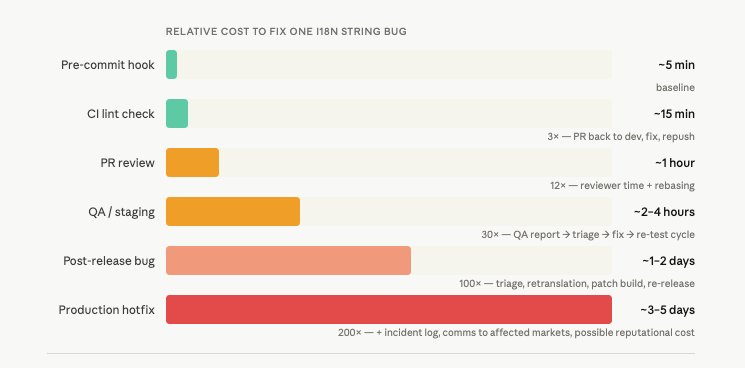
CI catches things before they merge. Pre-commit hooks catch things before they’re even pushed, which is faster feedback and less noise in PR reviews.
Using lint-staged with your i18n ESLint rules, you can run string checks only on files changed in the current commit — keeping it fast enough that developers don’t disable it.
// .lintstagedrc
{
  "*.{js,jsx,ts,tsx}": [
    "eslint --rule 'i18next/no-literal-string: error' --no-eslintrc"
  ]
}
The rule of thumb: everything that can be caught locally should be caught locally. CI is the safety net, not the primary feedback loop.
The one failure nobody talks about: the source string itself
All of the above assumes your English source strings are well-formed and translatable. Often, they aren’t.
// This string will reach your translators exactly like this.
t('save_confirmation', { defaultValue: "Changes saved! 🎉" })

// Problems:
// 1. The emoji may render incorrectly or be culturally inappropriate in some locales.
// 2. "Changes saved" is ambiguous — saved where? As in rescued, or persisted?
// 3. No context about where this appears, what triggered it, or what "changes" means.
A scanner cannot catch these problems. But a string linting step on the source values themselves can catch some of them:
Emoji in UI strings (flag for review)
Strings over a length threshold that will break UI in text-expansion languages (German expands ~30%, Finnish can expand ~60%)
Strings with no translation context/comment attached
Strings that appear to be sentences but end without punctuation (or vice versa — inconsistent punctuation is a translation signal that something is wrong)
This is the layer most teams never build. It’s also the layer that most directly improves translation quality — because it improves the source before anyone translates it.
Where things break down even with a good pipeline
Having the tooling is not the same as the tooling working. A few failure modes that survive even well-structured pipelines:
The coverage threshold that never moves
Teams set a coverage gate at 80%, ship, and never revisit it. The threshold stops being a quality signal and starts being a number the pipeline checks so everyone can feel fine. Review your thresholds per locale, per quarter.
The scanner that never covers your whole codebase
ESLint i18n rules are easy to configure for your main app code. They are less often configured for your component library, your internal tooling, your admin panel, your email templates. Each of these is a separate surface with its own untranslated strings. Map your surfaces before you assume you’re covered.
The TMS sync that runs but nobody checks
Strings push to the TMS, but the translation workflow on the other side is not set up to handle them promptly. New strings sit untranslated for weeks. By the time translations come back, the feature has been live in English-only for two release cycles.
The pipeline does not fix a broken translation workflow. It just makes the handoff cleaner. The workflow itself needs ownership.
Key naming that carries no meaning
// This is the key you'll be debugging in eighteen months:
t('label_47')

// This is the key that communicates intent to translators and future engineers:
t('checkout.order_summary.total_price_label')
No scanner enforces key naming conventions, but your CI can. A custom ESLint rule that validates key format against a regex is ten lines of code and saves significant cognitive overhead over time.
Final thoughts: language is a build artifact
Here is the mental model shift that makes all of this click.
Your translation files are build artifacts. Like your compiled code, your test coverage report, your bundle size analysis — they have a correct state, and that state can be verified automatically.
A missing translation key is a build error. An untranslated string rendered to a French user is a broken feature. A locale file that hasn’t been synced to the TMS is stale code.
Once you treat it this way, the pipeline work becomes obvious. You already have automated checks for code correctness, test coverage, and bundle size. i18n coverage belongs in the same category, enforced the same way.
The teams that get this right are not the teams that care more about localization. They are the teams that stopped treating localization as someone else’s problem and put it in the pipeline where it belongs.
Before you go, a small meta-note. The i18n pipeline I described above is one I’m actively building with AI. I use Claude and a multi-agent setup to handle different stages of the workflow: scanning for hardcoded strings, extracting keys, flagging concatenation patterns. Then a semantic layer via Black Ice checks terminology consistency, style, and market availability — so a term that works in en-US gets validated before it assumes it works in de-DE or ja-JP. Writing about i18n infrastructure while building it with the same tools is, I’ll admit, a very specific kind of fun.
🫂 Thanks Julia!
Marcos back!
I want to send a deep Thank You to Julia | Taking you global for sharing her experience on the Product Platform area and localization. To learn more from Julia, subscribe NOW to her newsletter 👇
