

Welcome, to the real world.
— Morpheus, Matrix
All the tutorials on YouTube tell you how to deploy an MCP server locally and, sometimes, even in the Cloud.
All of them have the same problem: They don’t solve a real-world problem. That’s what I bring you.
This is the first of three newsletter issues dedicated to how to enable MCP Servers in the real world.
In today's email, I'll walk you through the main problems to solve and a practical approach to tackling them when you have to deploy MCP Servers in Production at scale.
If you are a Software Engineer trying to understand the main challenges at the time of deploying MCP Servers in Production, this email is for you. Know someone who might be interested in this topic? Forward them the email 👇🏻
You most likely have the following use cases knocking on your door:
Development teams need to deploy MCP Servers so their users can use them across the organization through Claude Code, Cursor, etc, but they don’t know how to make it happen.
Product organization and other teams create quick-and-vibe proof of concepts they need to validate, but they have the same issue than develoepers, or even worse, because they are not even technical enough to understand how to do it.
With those use cases in mind, your challenges are the following:
Deployment. Where will the MCP Servers be running so the users can use them through their AI clients?
Delivery. Alright, you know where the MCP Servers will live now; how do you make them arrive there?
Security. How will authentication and authorization work for the MCPs?
You need a platform that helps the teams to achieve their goals quickly.
Let’s start with the first topic: Deployment.
👉🏼 Taking into account the use cases described at the beginning, you need to deploy to some kind of cloud instance. Why?
You can't expect MCP server owners to be responsible for distributing their software to users for local execution.
What about updates? You may want to distribute your MCP server through an AI Marketplace, but ensuring that updates are applied depends on the AI client's configuration.
At least some of your users aren't technical enough to deal with Claude Code or Cursor commands for installing and configuring MCP servers. In fact, they probably don't even know, or care, what an MCP server is.
Those three reasons can be summarized as follows: You cannot expect MCP server users to deal with the technical details of managing the setup.
👉🏼 The MCP Server should be available wherever it must be, so no technical users could tell Claude Code:
Hey, I want to use the application available in http://my.company.com/mcp/my-company-custom-designer
Another important point is maintainability, which becomes much simpler when you deploy in the cloud, at the time of:
Security patches released by the owners of the MCP Servers will arrive all at once to their users.
New features and maintainability will follow the same path, straight to the users.
The last part is how to deploy the MCP Servers into the cloud. If we focus on a cloud provider like AWS, we can find multiple options, such as:
Lambda Functions.
Fargate.
S3 bucket.
…
👉🏼 My recommendation: based on your current use cases, perform an analysis and pick up the fewest options as possible, so your platform becomes simpler.
📖 In my experience, a container technology like AWS Lambda or Fargate works pretty well for the use cases described above. But how can you decide?
Choose AWS Fargate if:
Your MCP server is frequently used or in production: It needs minimal and consistent latency so that the LLM’s interaction with the tools doesn’t feel slow.
You use HTTP transport with SSE: The standard for remote servers requires persistent connections, which Fargate handles natively and efficiently.
Your agent maintains a long workflow: Complex data analysis or coding tasks that take more than 15 minutes or that benefit from keeping variables and state in memory.
Cold start is a performance problem: Even though AWS Lambdas have improved a lot on this, maybe your case cannot afford the cold start of an AWS Lambda.
Choose AWS Lambda only if:
Usage is extremely sporadic: An MCP server that is only called a couple of times a day, where maintaining an active container on Fargate (even a small one) doesn’t justify the minimum monthly cost.
You expose simple event-based tools: Tools that perform a quick “fire and forget” action (e.g., “send an alert to Slack”, “check the weather on an external API”) where cold-start latency is not critical and uses a different transport mechanism or an intermediate API Gateway that translates REST calls to Lambda calls.
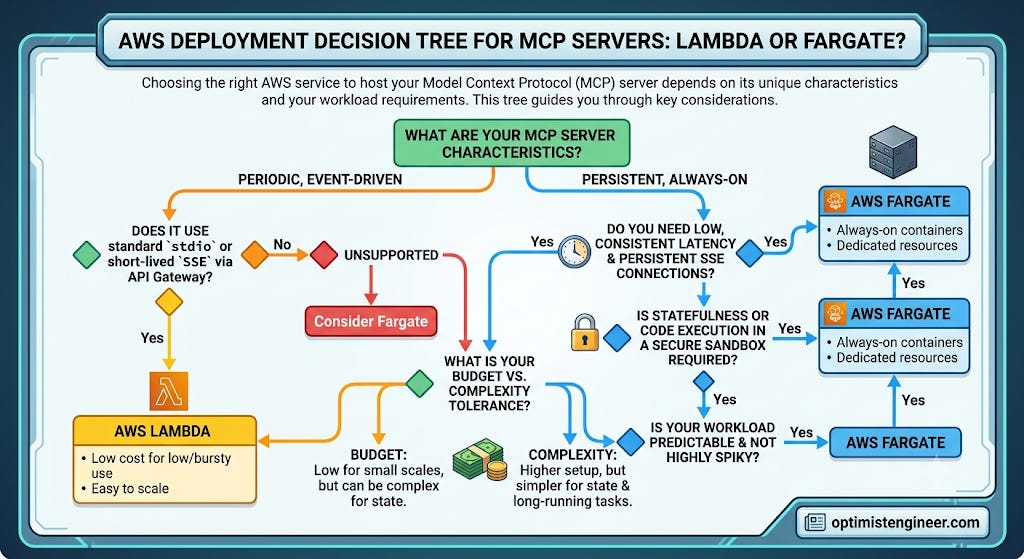
☝🏼 There is no “the best choice for deploying MCP Servers”, just different options based on the nature of the MCP Server.
📖 What did I do? I’ve started deploying MCP Servers via AWS Lambdas because the current usage of the MCP Servers is still sporadic.
A lot of things to process. Let’s wrap up for today.
✨ Takeaways
To make sure you don’t get lost in the infrastructure weeds, let’s look at the three or four key ideas that will shift your deployment approach from day one:
The Deployment Decision (Local vs. Cloud): Stop trying to distribute MCP servers locally. If your users are non-technical or you need instant security patching and feature delivery, your viable choice is the Cloud. Treat MCP servers as centralized web services, not local binaries.
The Compute Decision (Fargate vs. Lambda): When deploying on AWS, do not guess. Choose your compute model based on these strict technical boundaries:
Choose AWS Fargate if: You are running production-grade servers requiring consistent, low-latency; you rely on standard HTTP transport with Server-Sent Events (SSE), which requires persistent connections; or your agents run long, stateful workflows that exceed Lambda’s 15-minute execution limit.
Choose AWS Lambda only if: Your MCP usage is extremely sporadic (to avoid the idle costs of a persistent container) and your tools perform quick, stateless, “fire-and-forget” actions (like sending a Slack alert) where cold-start latency is acceptable.
The “Pragmatic First” Rule: Don’t build for hypothetical future scale. Start with the simplest, most cost-effective option that matches your current sporadic usage (even if it’s Lambda as a starting point) and evolve as usage data demands.
Coming up in the next issue...
Now that you have a clear grasp of the where (Deployment), the next edition will dive straight into the how: the challenge of Delivery. We will explore how to seamlessly automate the delivery from the developer’s repository right into the cloud without friction.
Best,
Marcos.